I have great news to share! Today I accepted a remote 3D animation internship position at Kashmir World Foundation! I'll be working with a team of animators to animate characters in videos promoting the foundation's various projects. The ideas for the videos sound very interesting, so I can't wait to start working with everybody!
If you haven't heard of the foundation, you should stop by their website. KwF is doing some great things, especially with 3D printed drones. Take a look!
I don't know when our first animation project will be finished, but I can't wait to show it to you guys when we release it to the public!
Until next time!
- Savanna
Showing posts with label animation. Show all posts
Tuesday, December 2, 2014
I'm Now an Intern!
Labels:
3D
,
animation
,
blog
,
career
,
intern
,
internship
,
Kashmir World Foundation
,
KWF
Wednesday, September 24, 2014
I'm an Animation Mentor Graduate!
I got my diploma in Advanced Studies in Character Animation! I'm now officially an AM alumnus!
I'm very excited to be graduated, but I'm also sad that AM is over. But I'll keep visiting the online campus, and I plan to keep on being a Peer Buddy, so I'll still be a part of the AM community.
Animation Mentor was such a great experience, and I finally feel that I have the skills I need to be a working animator. Now all that's next is to finish polishing up my reel, and then I can start applying to studios!
Labels:
3D
,
alumnus
,
animation
,
Animation Mentor
,
blog
,
cg
,
degree
,
diploma
,
graduation
Thursday, July 24, 2014
The Monsters: Bottle Battle- Animated Short Released
My CG animated short is finally released to YouTube! Check it out below, and please like, comment, and share if you enjoy it!
The short was 2 months in the making as a personal challenge to see if it was possible to create a full CG short in that time period. To complete my goal within that time limit I had to animate 30 shots in 30 days (the fastest I've ever animated). In Animation Mentor we have several weeks just to animate one 10 second shot, so this was a great exercise in animation speed. As a result, I'm much faster now! I also learned more about every other stage of CG film production from storytelling, camera angles, layout, lighting, rendering, and (of course) a lot of animation things. I especially got a lot practice animating all that running (I didn't use any run cycles). In the end, it's not my most polished work (you can see my most polished work in my demo reel) but I'm happy with what I created in the time I allowed myself.
If I got to do it all over again, there are dozens of things I wouldn't do and dozens of things I would. But that's just hindsight being 20/20, so I'm going to leave this alone (except for maybe polishing up a shot or two for my reel) and am thinking up my next short! I won't start it until after I graduate from Animation Mentor (which will be soon, it's currently week 4 of my last 12 week class). I want to get my demo reel all together and sent out first. Then I can work on the next short to distract me while I wait to hopefully hear back from studios.
I figure I'll probably always be working on a short, even once I get into a studio. It's just a fun thing to do, getting to tell a full story and play all the roles in its creation. Though it would be nice to collaborate with a person or two (and would probably produce a nicer result, especially if they know about all the non-animation things that I'm still learning about). I highly suggest that every CG artist create a short of some sort, either by themselves or with friends. It doesn't have to be a 12 month production, it can be a short 2 month production like mine. That way you can learn what not to do and what you need to improve on in a short amount of time.
If you've made a short, or are currently making a short, mention it in the comments below!
The short was 2 months in the making as a personal challenge to see if it was possible to create a full CG short in that time period. To complete my goal within that time limit I had to animate 30 shots in 30 days (the fastest I've ever animated). In Animation Mentor we have several weeks just to animate one 10 second shot, so this was a great exercise in animation speed. As a result, I'm much faster now! I also learned more about every other stage of CG film production from storytelling, camera angles, layout, lighting, rendering, and (of course) a lot of animation things. I especially got a lot practice animating all that running (I didn't use any run cycles). In the end, it's not my most polished work (you can see my most polished work in my demo reel) but I'm happy with what I created in the time I allowed myself.
If I got to do it all over again, there are dozens of things I wouldn't do and dozens of things I would. But that's just hindsight being 20/20, so I'm going to leave this alone (except for maybe polishing up a shot or two for my reel) and am thinking up my next short! I won't start it until after I graduate from Animation Mentor (which will be soon, it's currently week 4 of my last 12 week class). I want to get my demo reel all together and sent out first. Then I can work on the next short to distract me while I wait to hopefully hear back from studios.
I figure I'll probably always be working on a short, even once I get into a studio. It's just a fun thing to do, getting to tell a full story and play all the roles in its creation. Though it would be nice to collaborate with a person or two (and would probably produce a nicer result, especially if they know about all the non-animation things that I'm still learning about). I highly suggest that every CG artist create a short of some sort, either by themselves or with friends. It doesn't have to be a 12 month production, it can be a short 2 month production like mine. That way you can learn what not to do and what you need to improve on in a short amount of time.
If you've made a short, or are currently making a short, mention it in the comments below!
Labels:
3D
,
animated short
,
animation
,
Bird Ball
,
blog
,
Bottle Battle
,
cg
,
film
,
fun
,
Maya
,
Mental Ray
,
Monster Ball
,
movie
,
The Monsters
,
Twig
,
video
,
YouTube
Thursday, July 3, 2014
Announcing "The Monsters"- My Upcoming Animated Short Film!
I'm happy to announce that "The Monsters," a CG short film I've been working on for over over a month now, is going to be coming out sometime this month! I say "sometime" because I'm still working on it. I'm in the latter stages of animation, but still have plenty of work to do, never mind the lighting and rendering (I'm using image based lighting and final gather with Mental Ray, so each frame takes a decent amount of time). Anyway, here's the first promo poster!
It'll be about 2 and a half minutes to 3 minutes long and, as the poster says, is an action-comedy. I can't really say too much without giving it all away (3 minutes takes a long time to animate, but a short time to watch). However, I will say that the possible subtitle for the film is "The Bottle Battle." It should be fun! There's no dialogue, just a lot of physical humor due to some conflict between the characters. It's kind of like one of the old Road Runner or Sylvester and Tweety cartoons.
![]() |
| Work in Progress Screenshot from Maya |
I'm not doing it for Animation Mentor or anything (though the characters are the AM rigs Monster Ball, Bird Ball, and Twig). It's a personal challenge I've set myself to see if (A) I can make a short all on my own, and (B) how fast I can do it. Which is why I'm using pre-existing rigs and several free props, along with the props and set that I made, to help speed it all up.
![]() |
| Work in Progress Screenshot from Maya |
It's been quite a challenge so far, but I've learned/improved a lot at so many different things that it's been worth it. I've gotten a lot faster at animating, which is good since my last class gave us 11 weeks to make a 15 second 2 character dialogue. That's fine for school (and actually really good since you have the time to slow down and learn) but in a real production environment you have to work a lot faster than that, which is what I'm trying to train myself for here. And on top of that, it's just fun to be able to produce animation faster because you get it out of your head and onto the screen quicker.
Anyway, I'll keep this blog updated about the film's progress through the last few weeks. When it's finally released, you'll be able to find it on my YouTube channel.
Until next time!
Labels:
3D
,
animated short
,
animation
,
Autodesk
,
Bird Ball
,
blog
,
Bottle Battle
,
cg
,
film
,
Maya
,
Mental Ray
,
Monster Ball
,
movie
,
short
,
The Monsters
,
Twig
,
video
,
YouTube
Friday, June 27, 2014
Hand Practice Animation
Check out my new animation- a hand practice piece I did a few weeks ago. I did it while working on my AN05 Advanced Acting dialogue assignment because I was having trouble with the hand poses. It's based on webcam footage I filmed of myself making various hand gestures. Since I'm on break this week, I polished it up and rendered it out (using some of the lighting things I've learned from Digital Tutors). Doing this helped my hand animation skills a lot! I learned more about creating nice hand poses, getting into and out of those poses, and holding the poses while still keeping the hands "alive." I also thought it was interesting how the forearm and upper arm responded to the movements of the fingers/wrist.
Anyway, here's the animation! If you want to see my animations as soon as I upload them, subscribe to my YouTube channel.
Animated in Maya 2013, rendered with Mental Ray.
Anyway, here's the animation! If you want to see my animations as soon as I upload them, subscribe to my YouTube channel.
Animated in Maya 2013, rendered with Mental Ray.
Monday, June 23, 2014
New Progress Reel- Animation Mentor Class 5
I just finished Animation Mentor Class 5- Advanced Acting! All I have left is to take Class 6- Polish and Portfolio, and I'll be an AM graduate!
I considered putting my AN05 animation into a new demo reel (my current one is here), but decided to wait. I decided that because #1: I want to re-render all these shots since I've been learning more about lighting with Digital Tutors (I got 1 free month for entering the CG Student Awards). And #2: I'm going to start revising many of these shots in AN06 in just 1 week. So I decided I'll wait until the end of Class 6 to upload a new demo reel.
It'll be nice to be able to go back and rework these shots in AN06. I've learned so much the last few months that already several things stand out to me, especially in my AN02 and AN03 work. I may even get to make a whole new shot/sequence in AN06, depending on what my mentor decides. Either way, it should be fun, and I'll graduate with a great looking demo reel!
But that'll be about 13 weeks from now, so in the meantime, here's my progress reel! It's pure Maya 2013 playblast animation, no rendering, no extra music, etc. Again, if you want to see my prettier demo reel (with rendering and music, but minus my AN05 animation) you can see it here: http://youtu.be/ClDsJu92_88 .
I considered putting my AN05 animation into a new demo reel (my current one is here), but decided to wait. I decided that because #1: I want to re-render all these shots since I've been learning more about lighting with Digital Tutors (I got 1 free month for entering the CG Student Awards). And #2: I'm going to start revising many of these shots in AN06 in just 1 week. So I decided I'll wait until the end of Class 6 to upload a new demo reel.
It'll be nice to be able to go back and rework these shots in AN06. I've learned so much the last few months that already several things stand out to me, especially in my AN02 and AN03 work. I may even get to make a whole new shot/sequence in AN06, depending on what my mentor decides. Either way, it should be fun, and I'll graduate with a great looking demo reel!
But that'll be about 13 weeks from now, so in the meantime, here's my progress reel! It's pure Maya 2013 playblast animation, no rendering, no extra music, etc. Again, if you want to see my prettier demo reel (with rendering and music, but minus my AN05 animation) you can see it here: http://youtu.be/ClDsJu92_88 .
Friday, August 2, 2013
WILWA #1- Lifting a Foot
What I Learned While Animating #1
Lifting a Foot
From my Experience Animating "Ballie Jump"
When I first animated Ballie lifting his foot to move back on the block I did it like he was taking a step. He lifted his foot high and didn't let it touch the ground until he was placing it down. It sounds fine in writing, but it looked off somehow. I finally figured out why by acting out the shot myself (another reason to film your own reference instead of just using YouTube).
The action looked strange because in real life people don't lift their feet- they lift their heel and the foot follows. It's true. Remember, even though you probably often animate IK legs, real legs are an FK chain. The foot doesn't move the leg, the upper and lower leg bones move the foot.You're probably sitting right now. Try moving your foot to the right a bit, enough that you have to lift your leg some. What did you notice? Your whole foot probably didn't lift off the ground. Your ankle lifted and your heel lifted, but your toes just dragged, still contacting the floor.
This is how people move their feet when just adjusting them or taking a small step. The larger the movement, the higher the leg, ankle, and foot lift. The smaller the movement, the more the toes drag. I believe that in forward movements it is more likely that the whole foot will leave the floor, simply because friction makes it hard to shove your foot forward without lifting it, but I'm sure that's not always true.
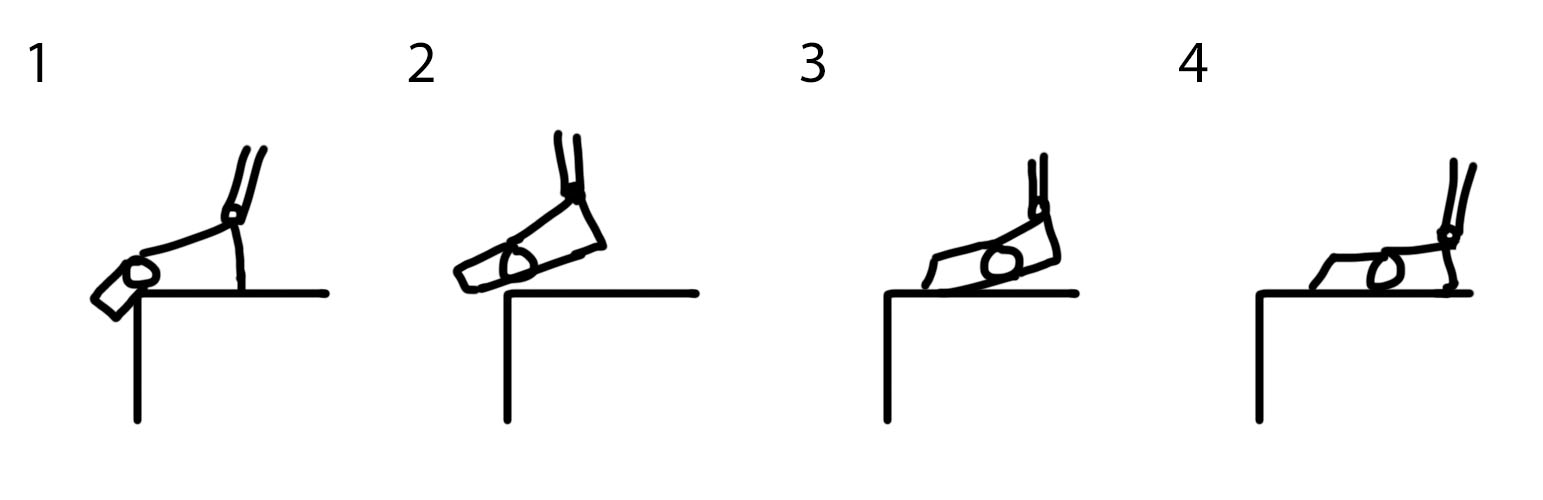
Now back to the shot. Ballie's step was tiny, but not small enough to just drag the toes. There had to be a little lift in the movement as he clears the ledge. Here's the moment from the animation. It has a small arc, and it's hard to see in the screenshots, so I drew up some diagrams to better show you what is happening.
#1- The foot is on the ground and the toes rest on the ledge.
#2- The ankle lifts and the toes move up to clear the ledge. If the toes just dragged, they could get caught on the ledge, and Ballie doesn't want that.
#3- Now that his toes are clear, Ballie begins to conserve energy by letting his his foot go back to the ground, the toes dragging. Remember, everything always wants to conserve energy when possible.
#4- The toes drag back until the heel comes down in the new foot position.
And that's it. It's simple, but it took me some time to figure out that this was the right way to do this small movement.
Questions or comments? Post them below. I'll post another WILWA (not the best acronym, but not the worst) after I upload my next animation. The next one may be a dog one, so it could have some good quadruped animation tips/tricks.
Until next time!
Thursday, August 1, 2013
Ballie Jump Animation Test
In my previous post about Animation Mentor I mentioned that since AM is just one class, you may have time to practice other things, like rigging or drawing. Or you could be like me and just animate even more! I actually do draw as well, but I usually upload my drawings to my deviantART or Tumblr. But I may upload compilations of my drawing work here every once in a while.
Anyway, this is a jump animation I did in my free time. My class isn't using Ballie, but I wanted to try him out and this seemed like a great test to use him in. I'd love some feedback on it!
In my next post I'm going to start a new type of post that I call "What I learned while animating." I plan to do this for each animation I upload here. It should be helpful to other animators and will be good in case I ever forget whatever technique/trick I learned.
Until next time!
Anyway, this is a jump animation I did in my free time. My class isn't using Ballie, but I wanted to try him out and this seemed like a great test to use him in. I'd love some feedback on it!
In my next post I'm going to start a new type of post that I call "What I learned while animating." I plan to do this for each animation I upload here. It should be helpful to other animators and will be good in case I ever forget whatever technique/trick I learned.
Until next time!
Wednesday, July 31, 2013
Animation Mentor!
I'm an Animation Mentor student now! Actually, I have been for six weeks, I just happened to get around to writing this now. My demo reel got me waived out of the first class, so I'm in class 2: Animation Body Mechanics Basics.
It's been great so far. I've learned so much about animation and about the animation industry. My mentor (an ILM animator) gives really great critiques and I've seen great improvements in my work already. All the other students in the class with me are awesome, too. Not only are they as passionate about animation as I am, but they give great feedback. And of course, I get to use the great AM rigs, including the new Stella, Stan, and Sloan.
I highly recommend Animation Mentor to anyone who is considering becoming an animator, and I think that it is a perfect substitute to the traditional 4+ years at art college. As you can see on my About page, I did 3 years at two different art colleges, and while both were great and I learned many things, I do think that AM provides a more streamlined and detailed animation education.
That last part, the amount of detail, is what I especially like about AM. We don't just learn how to animate a walk cycle by copying from the poses in The Animtor's Survival Kit. We learn the science and fine details behind it. The lectures even include lessons from a physiologist describing why we walk the way we do. It's that kind of knowledge that helps make good animation become great.
I know that some people's concern about AM is that they think #1- they'll only learn animation, and #2- all AM graduates animate the same. While it is true that the character and animal animation tracks don't teach modeling/texturing/rigging, etc. it's not like those are things you can't learn on your own. There are tons of free and paid resources online that can teach you about those subjects. After all, AM is only one class at a time. If you're at a traditional art college you would be dealing with 3-5 classes a week. So at AM you should have plenty of time to do your classwork, have a job, and practice some extra things on the side if you want (though my mentor did warn us against becoming "jacks of all trades, but master of none"). Also, you do have to draw as an AM student, so it's not like you'll never pick up a pencil. There aren't any official class lessons about drawing, but you'll naturally improve because of the weekly sketchbook assignments, and you can improve even faster if you sketch in your free time.
And as far as all AM graduates animating the same, that's only true if animating the same means making great animation. One of the first things my mentor said in our first Q & A was that we could tell him what style we were going for in our shots and he'd critique us accordingly. Some students choose to animate in a more cartoony style, and some more realistically. We are not being taught to animate in the same way, we are just being taught to animate well, and then we can adjust our work to our stylistic preferences. If you know how to animate well, meaning you understand the principles and techniques, you can switch between styles depending on the project. I may take a few days to transition from usually working in a cartoony style to working in a realistic one, but it's not like you have to go learn a whole different thing. Animation is animation, it's just how you set the poses, timing, and spacing that changes the style.
So what I generally wanted to say with all this is that I'm very happy to now be an AM student. And if you are like I was for years, thinking "Should I go to Animation Mentor even though I won't get a college degree?" my answer is yes, you should. In this field, degrees don't matter. Skill does. You can go to the fanciest animation college in the world, but if an AM student applying for the same job as you can animate better, they'll get the job. But whether you go to AM or to art college, just keep practicing and having fun with your work and you'll be fine.
Until next time!
It's been great so far. I've learned so much about animation and about the animation industry. My mentor (an ILM animator) gives really great critiques and I've seen great improvements in my work already. All the other students in the class with me are awesome, too. Not only are they as passionate about animation as I am, but they give great feedback. And of course, I get to use the great AM rigs, including the new Stella, Stan, and Sloan.
I highly recommend Animation Mentor to anyone who is considering becoming an animator, and I think that it is a perfect substitute to the traditional 4+ years at art college. As you can see on my About page, I did 3 years at two different art colleges, and while both were great and I learned many things, I do think that AM provides a more streamlined and detailed animation education.
That last part, the amount of detail, is what I especially like about AM. We don't just learn how to animate a walk cycle by copying from the poses in The Animtor's Survival Kit. We learn the science and fine details behind it. The lectures even include lessons from a physiologist describing why we walk the way we do. It's that kind of knowledge that helps make good animation become great.
I know that some people's concern about AM is that they think #1- they'll only learn animation, and #2- all AM graduates animate the same. While it is true that the character and animal animation tracks don't teach modeling/texturing/rigging, etc. it's not like those are things you can't learn on your own. There are tons of free and paid resources online that can teach you about those subjects. After all, AM is only one class at a time. If you're at a traditional art college you would be dealing with 3-5 classes a week. So at AM you should have plenty of time to do your classwork, have a job, and practice some extra things on the side if you want (though my mentor did warn us against becoming "jacks of all trades, but master of none"). Also, you do have to draw as an AM student, so it's not like you'll never pick up a pencil. There aren't any official class lessons about drawing, but you'll naturally improve because of the weekly sketchbook assignments, and you can improve even faster if you sketch in your free time.
![]() |
| Some of my AM Sketches. Circled poses I chose to recreate with Stella. |
And as far as all AM graduates animating the same, that's only true if animating the same means making great animation. One of the first things my mentor said in our first Q & A was that we could tell him what style we were going for in our shots and he'd critique us accordingly. Some students choose to animate in a more cartoony style, and some more realistically. We are not being taught to animate in the same way, we are just being taught to animate well, and then we can adjust our work to our stylistic preferences. If you know how to animate well, meaning you understand the principles and techniques, you can switch between styles depending on the project. I may take a few days to transition from usually working in a cartoony style to working in a realistic one, but it's not like you have to go learn a whole different thing. Animation is animation, it's just how you set the poses, timing, and spacing that changes the style.
So what I generally wanted to say with all this is that I'm very happy to now be an AM student. And if you are like I was for years, thinking "Should I go to Animation Mentor even though I won't get a college degree?" my answer is yes, you should. In this field, degrees don't matter. Skill does. You can go to the fanciest animation college in the world, but if an AM student applying for the same job as you can animate better, they'll get the job. But whether you go to AM or to art college, just keep practicing and having fun with your work and you'll be fine.
Until next time!
Wednesday, August 1, 2012
Do You Need a Degree in Art?- Cons
Last time, I discussed my pros for getting a college degree in art. But what are the cons?
#1- You may spend an unnecessary amount of time and money. Art school can be expensive. Very expensive. It can also take a long time to start getting into your major. As you're trudging through foundation classes, general education classes, and classes plain not related to your major, you'll be looking at your tuition bill saying "I paid this much for that?" Like I said, my college has writing majors doing foundations drawing classes. As can be imagined, many of them struggle through those classes. It doesn't matter that it's not your area of interest, or that you've barely drawn before, you still have to pass those classes.
#3- You can learn pretty much everything for cheaper through non-degree programs. There are tons of online programs/schools/seminars to teach you whatever you want to know. Some of them may cost thousands, but often they offer some sort of loan program, and aren't as expensive as college anyway. These tend to give you a certificate of some sort that you could put in the place of a degree on your resume. Some even have alumni programs. And just because they focus on one area (like Animation Mentor only focuses on animation) doesn't mean you can't learn other important areas on your own.
#4- You may be greatly inconvenienced. If you've got to move, either to a dorm, an apartment, or a new house if you are able, you may be inconvenienced by the process. You may also be inconvenienced by unsatisfactory transportation accommodations (some colleges don't let you bring cars, and on others cars are absolutely necessary). Some colleges (even big ones) may also only offer certain classes on certain times on certain days. I have had to take many classes at times that were far from ideal for me, simply because that was the only time/day that class was offered for the quarter. Trust me, they won't tell you about that in those college brochures.
#5- You may not need a degree in the first place. You're not going to make a great sculpture and show it to an art dealer to hear, "Yeah, it's beautiful! But do you have a degree?" And if you plan to work freelance, most people are just looking for people with skills, not necessarily people trying to work off college debt. If you plan to work for yourself, obviously a degree isn't any sort of issue (though do keep in mind that you may have to work for other people during the slow times).
So my conclusion is, do a bit of research and see how many jobs in your field actually ask for a degree. Then make your own pro/con list. If you've got the courage (and it seems like a sensible idea) I say try the no-degree road. College will still be there if you need it. And if you really can't decide, I say go with college, just to be on the safe side. In the end, with a degree or without, you'll still be able to be a great artist in your field. The main difference will be how long it takes you and how much it costs.
I hope this was helpful! Until next time!
Tuesday, July 31, 2012
Do You Need a Degree in Art?- Pros
Today I'm going to answer a question that I think many young artists ask: Do I need a degree if I'm going to become an artist? And by artist, I mean illustrator, animator, graphic designer, photographer, sculptor, writer, etc. I know I asked myself that very question when looking at schools to get an animation degree from. I asked myself that question my first year of college as well. I'm about to be 3 years in, so it no longer matters if the answer is yes or no because I'm going for a degree anyhow. But I still wonder, how much will this degree help me?
I think that everyone now knows that getting in a degree in this day and age does not mean the same thing as getting a degree "way back when." Nowadays, almost everyone has some sort of degree in something, so having a degree doesn't make you stand out that much. On top of that, because of the Internet, people can learn so many things on their own, or from non-degree online training programs. So will a degree help?
The answer is that there really is no answer. The answer will vary based upon your field, your skills, and your goals. A great self-taught animator is going to be hired over a mediocre animator with a degree. But a lame self-taught animator isn't going to be given a second thought if an awesome animator with a degree shows up. It will all depend on you.
But before you decide to let a coin toss choose whether you go to college or not, consider these pros for getting a college degree in your art field.
#1- You'll get great training (for the most part). How well you will be trained will depend on how good your professors are and how much you apply yourself. Don't think that you won't get a good education at a cheaper school. Even fancy art schools can have so-so professors, just as cheap art schools can have awesome professors. There's no way to know for sure until you step into the classroom. Reading college reviews can help, but you may not agree with the masses (some people love professors who don't give much work, which you may not like if you want to learn a lot). Also, the more you practice on your own, and the more you go "above and beyond" (a favorite phrase of my professors) with your assignments will factor into how much you learn.
#2- Some art jobs actually do require degrees. I have come across some animation jobs from studios that ask that applicants have a relevant degree. I haven't seen this all the time, but I have seen it. If you just want to work freelance, you shouldn't have to worry about that as much.
#3- You get a broader education. It doesn't matter what your degree is, trust me, you'll be taking some general art and education classes. My college has writers taking drawing classes, simply because a number of drawing classes make up the required foundation classes for all the majors. Also, I'm majoring in animation, but I have to take many other classes related to other parts of CG animation production. You may either love or hate this.
#4- You'll get industry experience and information. This will come as a result of your professors (who have always worked in the industry in some fashion or other) telling you what it's like "out there." They can help teach you important work practices that will allow you to mesh more easily into your first real industry job. They, or your school's career services department, can also help you get important industry connections.
#5- You'll have someone helping you get a job. Colleges like to boast high post-graduation employment numbers. They're going to do their best to help you get some type of job, either through their alumni website, job fairs, or other sort of student-only perks.
#6- You'll have a degree. If you're a bit old-fashioned when it comes to education like I am, you'll be happy with the feeling of security that will come with a degree. I would have loved to try some non-conventional education methods, like doing the Animation Mentor program, but I don't have the courage. I get really nervous at the idea of not having a degree. I've seen those charts that compare the income of a person with a degree and a person without a degree. I worry about being part of that lower line (though those charts never seem to show the incomes of people in art fields).
Tomorrow I'll discuss the cons associated with getting a college degree in art.
I think that everyone now knows that getting in a degree in this day and age does not mean the same thing as getting a degree "way back when." Nowadays, almost everyone has some sort of degree in something, so having a degree doesn't make you stand out that much. On top of that, because of the Internet, people can learn so many things on their own, or from non-degree online training programs. So will a degree help?
The answer is that there really is no answer. The answer will vary based upon your field, your skills, and your goals. A great self-taught animator is going to be hired over a mediocre animator with a degree. But a lame self-taught animator isn't going to be given a second thought if an awesome animator with a degree shows up. It will all depend on you.
But before you decide to let a coin toss choose whether you go to college or not, consider these pros for getting a college degree in your art field.
#2- Some art jobs actually do require degrees. I have come across some animation jobs from studios that ask that applicants have a relevant degree. I haven't seen this all the time, but I have seen it. If you just want to work freelance, you shouldn't have to worry about that as much.
#3- You get a broader education. It doesn't matter what your degree is, trust me, you'll be taking some general art and education classes. My college has writers taking drawing classes, simply because a number of drawing classes make up the required foundation classes for all the majors. Also, I'm majoring in animation, but I have to take many other classes related to other parts of CG animation production. You may either love or hate this.
#5- You'll have someone helping you get a job. Colleges like to boast high post-graduation employment numbers. They're going to do their best to help you get some type of job, either through their alumni website, job fairs, or other sort of student-only perks.
#6- You'll have a degree. If you're a bit old-fashioned when it comes to education like I am, you'll be happy with the feeling of security that will come with a degree. I would have loved to try some non-conventional education methods, like doing the Animation Mentor program, but I don't have the courage. I get really nervous at the idea of not having a degree. I've seen those charts that compare the income of a person with a degree and a person without a degree. I worry about being part of that lower line (though those charts never seem to show the incomes of people in art fields).
Tomorrow I'll discuss the cons associated with getting a college degree in art.
Saturday, July 14, 2012
A Bobcat That was 2 Years in the Making
I've finally finished making Bobby the Bobcat! For a while I thought he'd never be complete. But I've learned that while it may look like I abandon some projects, I always come back to them eventually. This goes for 2D art and CG work. I just can't stand starting something and not finishing it. But I think 2 years is the most I've let anything drag on. I think I let it go on for so long because school made me forget about him and college kept me too busy to work on him. But now that it's summer break I've been able to relearn/remember everything that I forgot about Blender (since I had been using Maya so much in college) and I was finally able to finish him. The confidence boost I got from my cute bunny turning out well also helped.
Here's a render of Bobby:
And a turntable:
And finally, here's his walk cycle:
He's a lot of fun to work with! I can't wait to do some more serious animations with him and with my bunny character!
You can download Bobby and see more images of him (including his wireframe and rig) here.
Until next time!
Labels:
animation
,
anthro
,
anthropomorphic
,
Blender
,
blog
,
Bobby
,
bobcat
,
cat
,
cg
,
Cycles
,
feline
,
model
,
render
,
Turbosquid
,
turnaround
,
turntable
,
video
,
walk cycle
Thursday, May 31, 2012
Mike W and Meeper
Hi, everyone! Sorry to have been so inactive over the last month, but I was busy with midterms, and then right after that got busy with final projects. But summer break has finally started, so now I'll be able to update things on here much more often.
To start, I have two new animations to show you. This first one was the second project for my 3D Character Setup & Animation class. We had to design, model, rig, and animate a character similar to Mike Wazowski from Monster's Inc., except without arms. Then we had to make him walk and have an expression change. I had a lot of fun animating this guy, especially with that big nose! I did have some trouble with his feet slipping, though, which I have since figured out how to avoid.
This second one was the final project for my 3D Character Setup & Animation
class. For this one, we were given a Meeper model, and had to rig it. Then we
had to animate him performing to a song. I chose to have him perform to Marvin
Gaye's "Pride and Joy." It was fun making him try to dance around to
the song, since he's such a clumsy, silly character. If you've never seen him
before, Meeper is the main character from the "Chubb Chubbs" animated
short.
I learned some good CG stuff this quarter, which I plan on expanding on this summer. So I should have some new rigs and animations to show you over the next couple of months. And don't worry, I haven't forgotten about finishing Bobby. I also plan to get back into drawing and digital painting, though I'll probably only post my favorite pieces here. To see everything else I make, you should check out my deviantArt gallery and my Tumblr.
Labels:
animation
,
blog
,
class
,
dance
,
Meeper
,
Mike W
,
performance
,
Pride and Joy
,
rigging
,
song
,
walk cycle
Thursday, April 12, 2012
Retro Robot Animation
Hi, guys! I know it's been a while since my last update, but I've been busy with school projects and a digital art commission, so I haven't had any time to work on Bobby. However, I did just finish an animation for my 3D Character Setup & Animation class (which is essentially a rigging class). The assignment was to design, model, rig, and animate a retro style robot, without using an armature. Everything you see here is controlled by hierarchies and constraints. It was a different way of working for me (I haven't rigged without an armature since my CG beginnings with Carrara 1.0), but it was interesting. I hope you like it!
Until next time!
Labels:
animation
,
assignment
,
blog
,
class
,
constraints
,
hierarchy
,
retro
,
robot
Sunday, April 1, 2012
Bobby Speaks!
I just finished my first test animation with Bobby! It was a lot of fun animating him, especially his face (I've always loved animating to dialogue). It was a good test run of the rig, too. I found and fixed a lot of things. There are still a couple of things I need to fix, and I think I want to reduce the specularity on his nose, teeth, and tongue materials. I'm going to make another test animation that doesn't have any dialogue, so I can test his legs and torso.
Anyway, here's the animation:
I found this to be helpful when rendering it out:
Until next time!